A free, open-source, community-built MMO project: Open Vanilla in Rust. Play Vanilla Remastered in your browser or desktop launcher, build and share mods, maps and quests in the Workshop, and host your own realm in a few clicks.
✦REALM LIST✦
REALM NAME ▲
TYPE
PLAYERS
STATUS
Vanilla Remastered is online
* To host your own realm, see Host your own realm below.
One Discord for the whole realm. It's where your account starts, and Discord's #world and the in-game World channel are bridged both ways, so you can talk with everyone from either side.
How to join
Join the Discord and press Enter the gate.
Answer the Herald's question about the rules.
Sign in with Discord on the realm. Your account and your number are yours.
Browser play · Vanilla Remastered · 11 addons · Play Solo · the Workshop · your own realmWatch the full tour →
Self-hosted server software
Host your own realm in one click
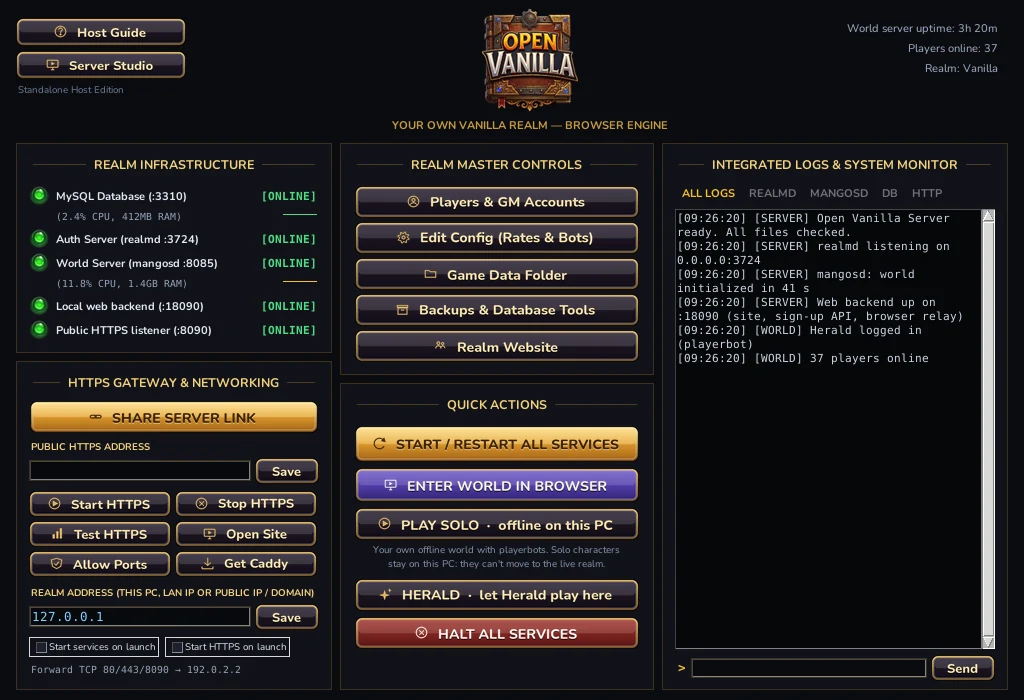
Open Vanilla Server runs a Vanilla realm on your own PC: an SPP Classics realm (database, login and world servers with playerbots) plus its website with sign-up and browser play, Server Studio and a GM console, all from one window. A separate download from the launcher, which is for playing.
Open Vanilla Server — every service, setting and log in one window.
Run it
One-click start, restart & halt
MySQL, realmd, mangosd and the web backend start, restart or halt together from Quick Actions.
Live status lights
Every service shows its port, online state and CPU/RAM, with uptime, connected players and bot counts up top.
Integrated logs & console
Per-service log tabs for realmd, mangosd, DB and HTTP, plus a built-in command line.
Share it
Public HTTPS gateway
A Caddy reverse proxy puts your realm on HTTPS with automatic certificates.
One-click invite link
Copy your public server address and send it straight to friends.
Firewall & port helper
Open the web ports your realm needs with one button.
Manage it
Player & GM admin manager
Create and manage accounts and assign GM levels.
Live config editor
Tune XP and drop rates and bot settings without hand-editing config files.
World database backups
Back up and restore the world database with the bundled toolset.
Play it
Asset extraction verification
Checks all ~79k extracted game files before your realm goes live.
Play in your browser
“Enter World” opens the WebGPU client in your browser, straight from the launcher.
Friends join from anywhere
Players only need a modern browser and your link — no client download.
Zero-Install Mod & Addon Repository
Quests
v1.1 • Quests & Navigation
Brass compass rose, directional radar, live coordinates, and objective pins engineered for seamless exploration.
Meters
v1.1 • Combat Metrics
Zero-latency damage and healing meters for you, your party, raid, and pets with zero client frame drops.
Threat
v1.1 • Threat & Aggro
Real-time threat tracking with tank warnings and pull thresholds for dungeon and raid survival.
Casting
v1.1 • Enemy Castbars
Accurate target spellcast progress bars and interrupt lockout timers resolved directly from Spell.dbc.
Bags
v1.1 • Unified Inventory
Clean 6-column unified bag container with instant text search and persistent banker storage memory.
Plates
v1.1 • Nameplates
Restyled high-contrast unit nameplates with bright difficulty level badges and target debuff timers.
Guilds
v1.1 • Guild Board
In-game community bulletin board with live guild recruitment listings and peer announcements.
Prices
v1.1 • Market Prices
Historical Auction House pricing database with 7-day memory, vendor sell values, and tooltip price medians.
Vendor
v1.1 • Vendor Automation
Automatic junk grey selling and 1-click equipment repairs directly from the merchant interact window.
Raid
v1.1 • Raid Tools
Quick raid target marking bar, synchronized pull timer countdowns, and party/raid ready check management.
Persona
v1.1 • Roleplay
Roleplay profiles for every player: name, title, appearance, bio, shares and an IC/OOC/LFRP status on tooltips, your target's portrait and a player directory. Type /rp.
Social
Vanilla Remastered • Friends & People
Friends, guild, group, /who, ignore and the people you've played with recently, all in one window. Press O or type /social.
Dungeons
Vanilla Remastered • Group Finder
A group finder board for every dungeon and raid: list yourself, browse by dungeon, ask to join, invite and endorse. Type /lfg.
Achievements
Vanilla Remastered • Achievements
Achievements for levelling, quests, exploring, dungeons, professions, reputation and PvP, tracked by the realm. Points and bragging rights, never power.
Chat
Vanilla Remastered • Chat
A sleek, readable chat window: five themes, timestamps, class colours, clickable links, copy and spam control.
Mail
Vanilla Remastered • Mailbox
Open All and Return All, tick several letters at once, Alt-click items in your bags to mail them, and name suggestions from your friends, guild and alts.
Loot
Vanilla Remastered • Loot Window
A clean loot window: every item on one list, money from every corpse added up, Take All, and one chat line for auto loot.
Talents
Vanilla Remastered • Talents
Free talent resets, two talent specs you can name and switch between, a talent planner with saved builds and share codes, and a note when you learn new spell ranks.
Essentials
Vanilla Remastered • Everyday Helpers
Everyday helpers for every zone, starting with the services you look for most: repairers, vendors, flight masters, innkeepers, trainers and bankers marked on your map.
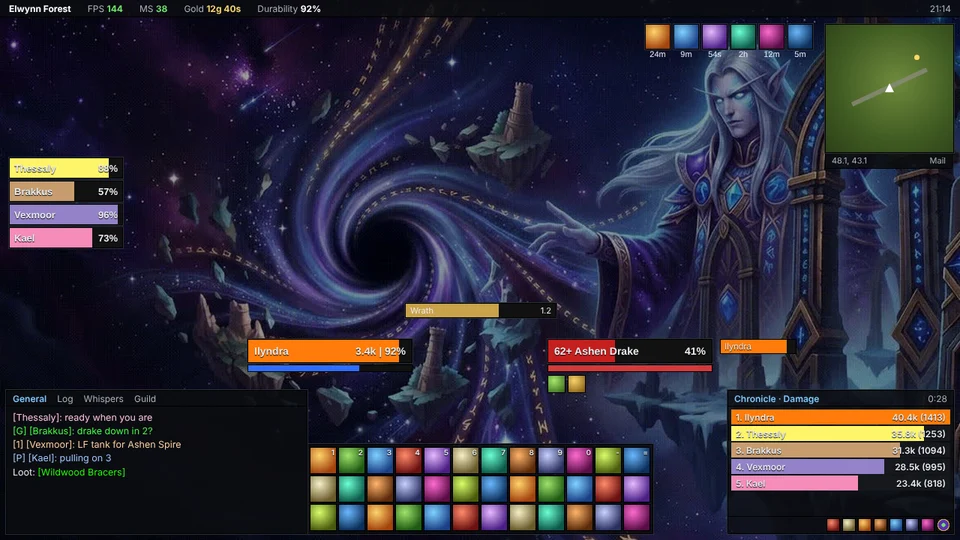
A complete makeover for players who like the ElvUI look, built on our own code and art.
Flat dark panels and an info bar: zone, FPS, latency, gold, clock
Class-coloured player and target frames either side of centre, with target buffs, target of target and party frames
Three rows of 12 action buttons in one block, a square minimap with mouse-wheel zoom
Chat and the Meters window docked in panels along the bottom
Every piece moves and scales with Move Anything (/move)
How to add it: in game, click the Game Menu button at the end of the menu bar, choose Workshop, then Add next to Repack (or type /workshop). The interface reloads with the new look. The same button takes it out again.
Made something? Submit your mod
Addons, UI skins and other mods built by players can join this list and the in-game Workshop, one click away for everyone.
Build it for Vanilla. A normal addon folder with its .toc (Interface 11200). Test it on the realm.
Zip the folder and add a screenshot and a line or two on what it does.
Post it on our Discord. Staff review every submission for safety and quality before it goes live.
It goes live. Approved mods appear here and in the in-game Workshop with your name on them.
Only your own work, please: no files taken from Blizzard or from other authors without their permission.
One launcher, OpenVanilla.exe: the native Open Vanilla engine (built on benilla), PLAY Online / Solo / Browser, hosting, 19 built-in Vanilla Remastered addons and account management.
OpenVanilla-Setup .exe (recommended) or portable .zip. Not code-signed yet: Windows may warn.
Open Vanilla Server runs SPP Classics with its website, sign-up, browser play and Server Studio from one window. Download it, point it at SPP, press Start.
Run it on your PC, or on a Linux VPS with one command
Notepad-Editable Mirror Configuration (links.txt):
Every download address shown here comes from links.txt in the project directory. Open it with Windows Notepad and set the VANILLA_DATA_URL line to point Get Vanilla Data at your data. The site picks up the change without a rebuild.
SIGN IN
Use your realm account. The game opens and logs you in.
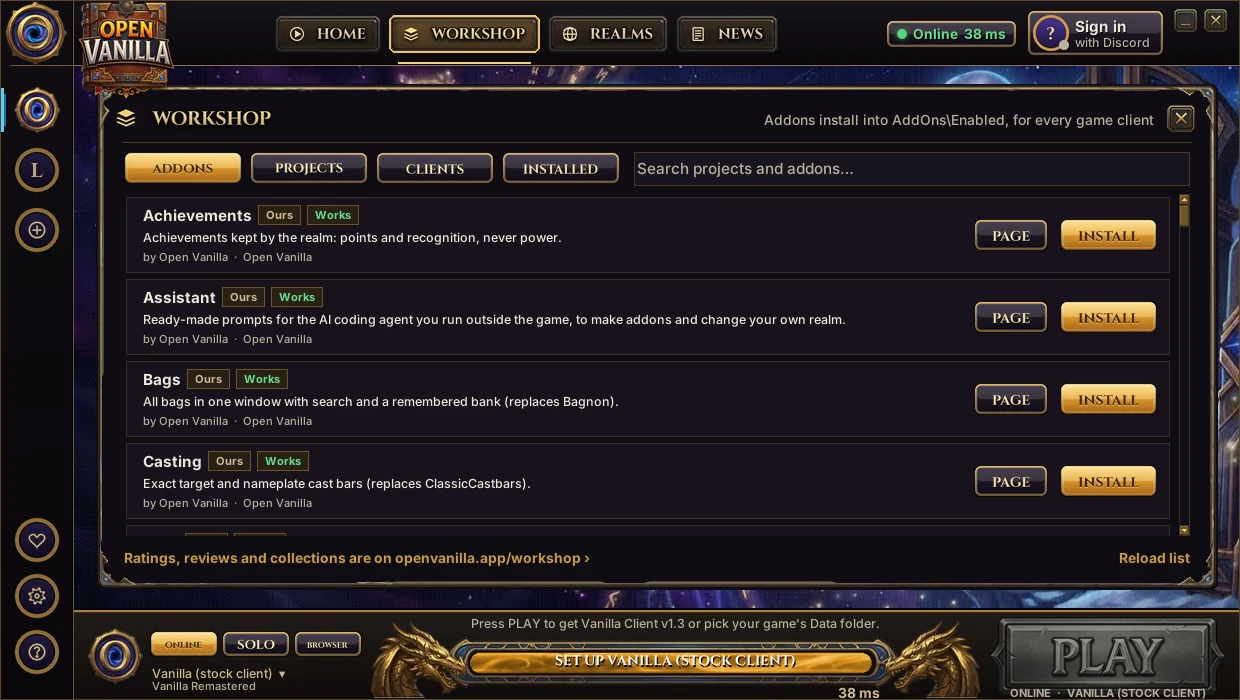
The Open Vanilla launcher is the one program you start. It runs the native Open Vanilla engine on your own game data,
signs you in with Discord, installs addons from the Workshop, takes you to any realm, and keeps everything up to date by itself.
Every Open Vanilla client ships with our own suite of 19 Vanilla Remastered addons, already installed. Nothing to download, no folders to copy. Many replace an addon Classic players already know.
Bagsreplaces Bagnon
All your bags in one window, with search and a remembered bank.
Metersreplaces Details! / Recount
Damage and healing meter for you and your group.
Questsreplaces Questie
A brass minimap compass with quest pins from the server and your coordinates.
Threatreplaces KTM
Exact threat on your target, straight from the server, with pull warnings.
Castingreplaces ClassicCastbars
Exact cast bars on your target and on enemy nameplates.
Platesreplaces Plater / KUI
Clean enemy nameplates that show your target's debuffs.
Pricesreplaces Auctioneer
Market and vendor prices on item tooltips, without auction scans.
Vendorreplaces SellJunk
One click sells your grey items and repairs your gear.
GuildsOpen Vanilla original
A guild recruitment board with one-click applications.
RaidOpen Vanilla original
Raid markers, ready checks and pull timers for parties and raids.
PersonaOpen Vanilla original
Roleplay profiles for every player, in the spirit of MyRolePlay and TRP. Write who your character is, and read anyone else's just by pointing at them.
Roleplay name, title, pronouns, age, home, motto, crest, appearance, bio and up to five shares
In character, out of character, looking for roleplay or storytelling, shown on tooltips and your target's portrait
A directory of everyone you've met, with a "looking for roleplay" filter
No server setup and no extra download. Type /rp in game
And 8 more Built in
Social: friends, guild, group, /who, ignore and recent people in one window.
Dungeons: a group finder board for every dungeon and raid. Type /lfg.
Achievements: points for levelling, quests, exploring, dungeons, professions, reputation and PvP.
Chat: a readable chat window with themes, timestamps, class colours and clickable links.
Mail: Open All, Return All, and Alt-click items in your bags to mail them.
Loot: every item on one list, money from every corpse added up, and Take All.
Talents: free talent resets, two named specs to switch between, and a planner with share codes.
Essentials: everyday helpers, like repairers, vendors, flight masters and innkeepers marked on your map.
In-game captures with the suite's demo data; the Guilds board and the Prices tooltip are filled in to show what the demo displays, and Persona is a faithful render of its window. Try it yourself: type /wnl demo in game.
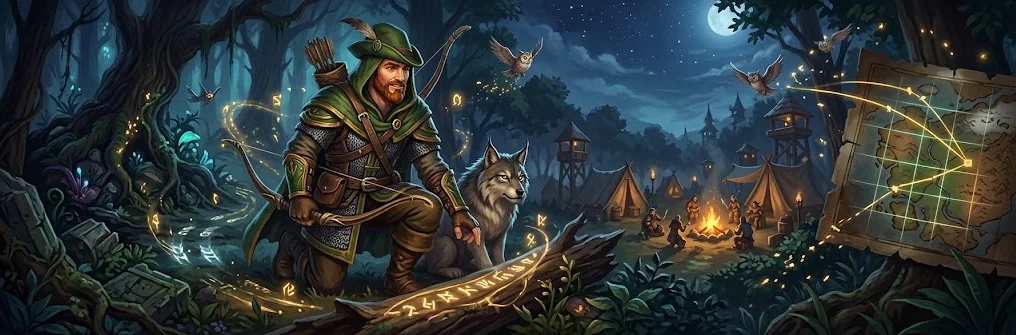
Meet the ranger who looks after the realm
Herald
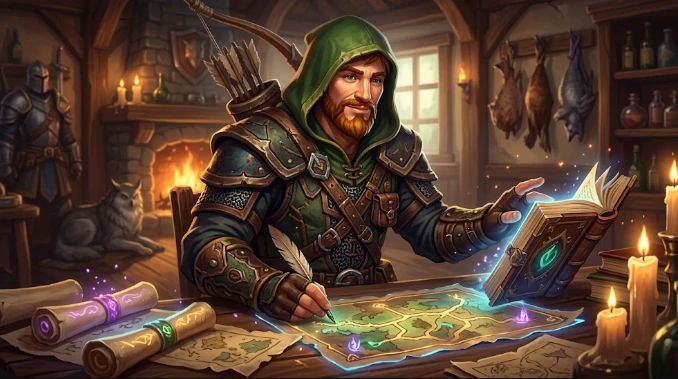
Herald is Open Vanilla's own self-learning companion: a Hunter in a green hood who plays the game every night, learns what works, finds what's broken, and keeps the Discord running. He's here to make the realm better for everyone, and later to walk beside you in game.
Learns from how you play Opt-in · coming
With your permission, and off unless you turn it on, Herald learns from anonymous play: which quests stall, where players die, which routes and pulls work. He also learns from his own runs every night. No chat, names or account details, ever.
Guides you in game Coming
Ask Herald where to go next, which quests fit your level, or why that pull keeps going wrong. He answers from what he's learned across thousands of runs, and points the way on your map.
Runs the Discord Live
Sign-ups and realm access
The support desk for in-game tickets
Moderation help: he sorts reports for the team, people make every call (rolling out)
The World chat bridge between Discord and the game (rolling out)
Live-stream alerts for creators (rolling out)
Herald never asks for your password.
Tests every release Live
Every night Herald signs in like a player, enters the world and checks that logins, the UI and the addons work, then reports what he found.
Finds and reports bugs Growing
Broken quests, spots where players get stuck, drops that never drop: Herald logs them with where and when, and the team fixes them.
Gets better every run Growing
He plans each run from the realm's own data, compares it with what really happened, and keeps the routes and tactics that win. Speedrun, typical and completionist runs each test something different.
Herald Autopilot: let him play for you
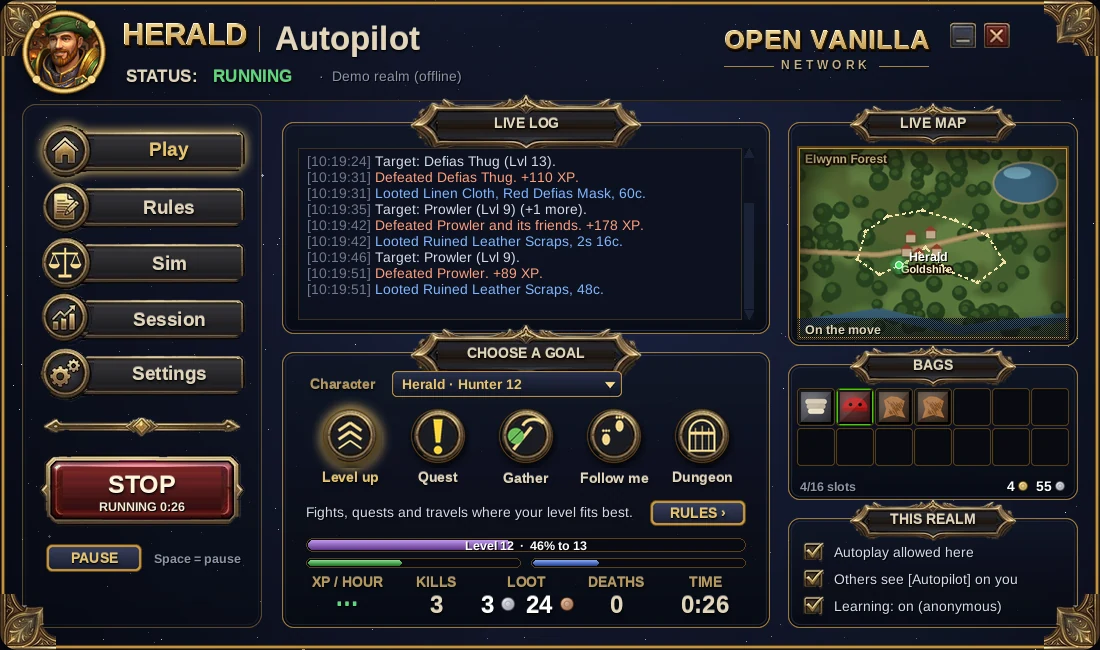
Hand Herald your character and watch him play it, any race and any class, on any realm whose owner allows it. Pick what he does, set his rules in plain sentences, and take back control whenever you like.
Play. Pick a goal and press START. The live log, map, bags and numbers update as he plays.
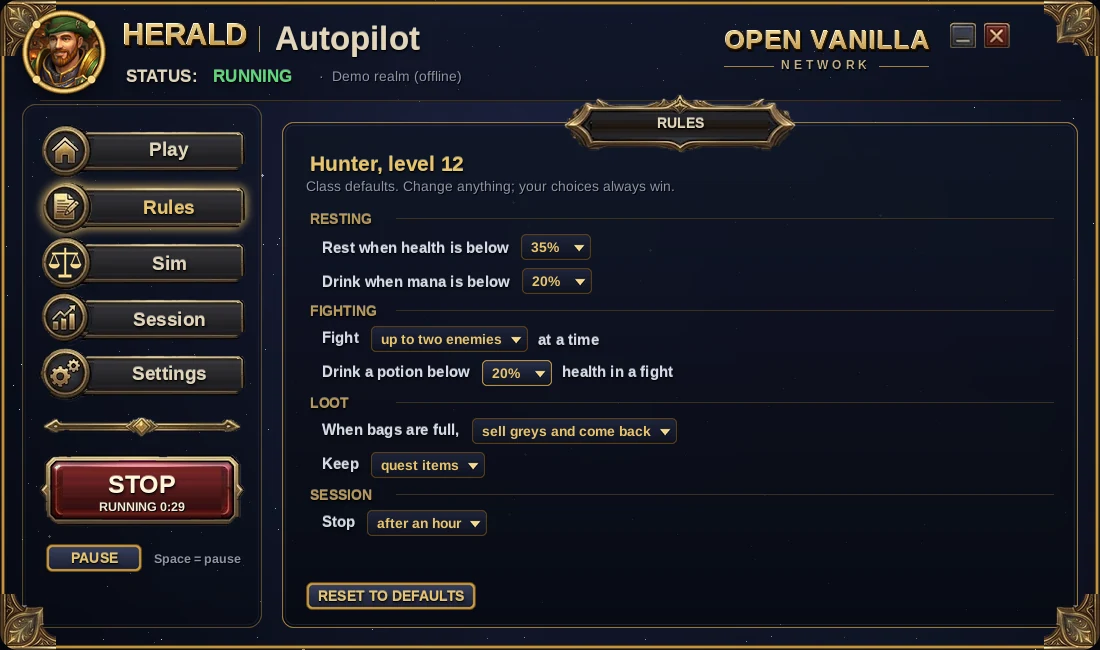
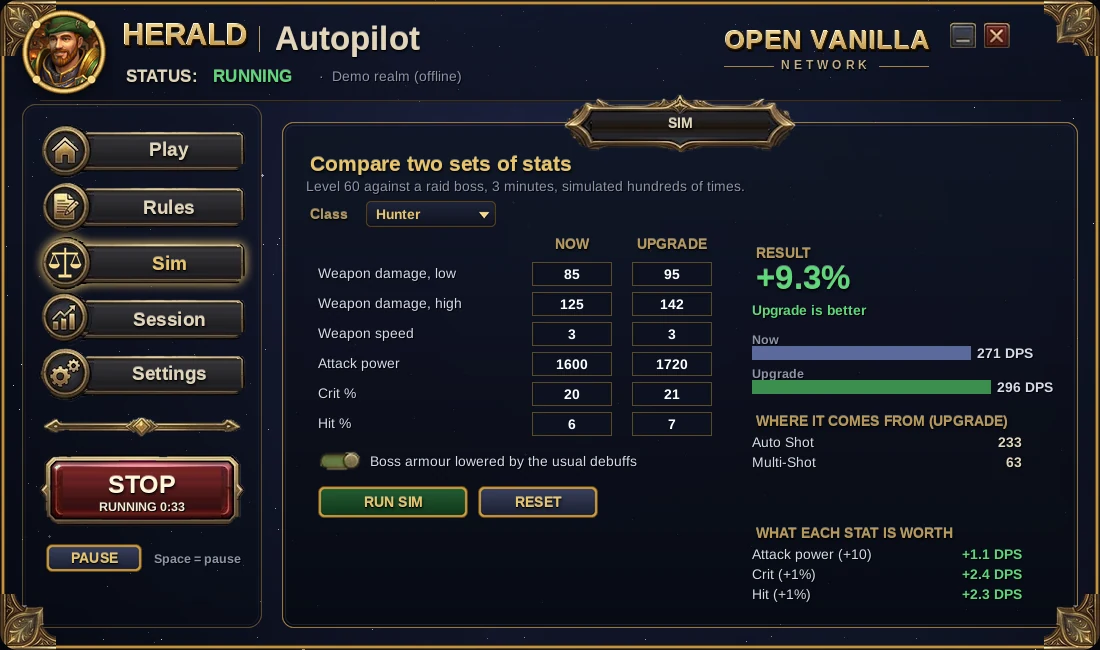
Rules. One sentence each, like "Rest when health is below 35%". Every class starts with sensible defaults.Sim. Compare two sets of gear or stats and see what each stat is worth.
Log in to your character, then click Herald by the minimap (or type /herald).
Press Let Herald play and pick Level up, Quest, Gather or Explore. He plays on the realm's own AI while you watch with your own camera and UI.
Press Take back control any time. The Herald Autopilot desktop app adds the rules, the sim and session numbers.
Screenshots from Herald Autopilot's offline demo. Running your own realm? Open Vanilla Server has a HERALD button and lets players use him by default.
Realms that welcome Herald
Herald only plays where a realm allows him. Realm owners switch each feature on or off:
Nightly health checks Live on Open Vanilla
Herald signs in each night and reports whether logins, the world and the addons work, so problems are found before players find them.
Test runs Opt-in
Herald levels test characters through quests and zones and reports broken quests, stuck spots and pacing. Full runs happen on test realms, short checks on live ones.
In-game guide Coming
Turn on Herald's guide for your realm's players: routes, quest tips and help, built from your realm's own data.
Herald's own characters are always marked as bots in game. He never counts in PvP rankings, the auction house economy or achievements, and a realm can turn him off at any time.
The Open Vanilla creator app
Vanilla Forge
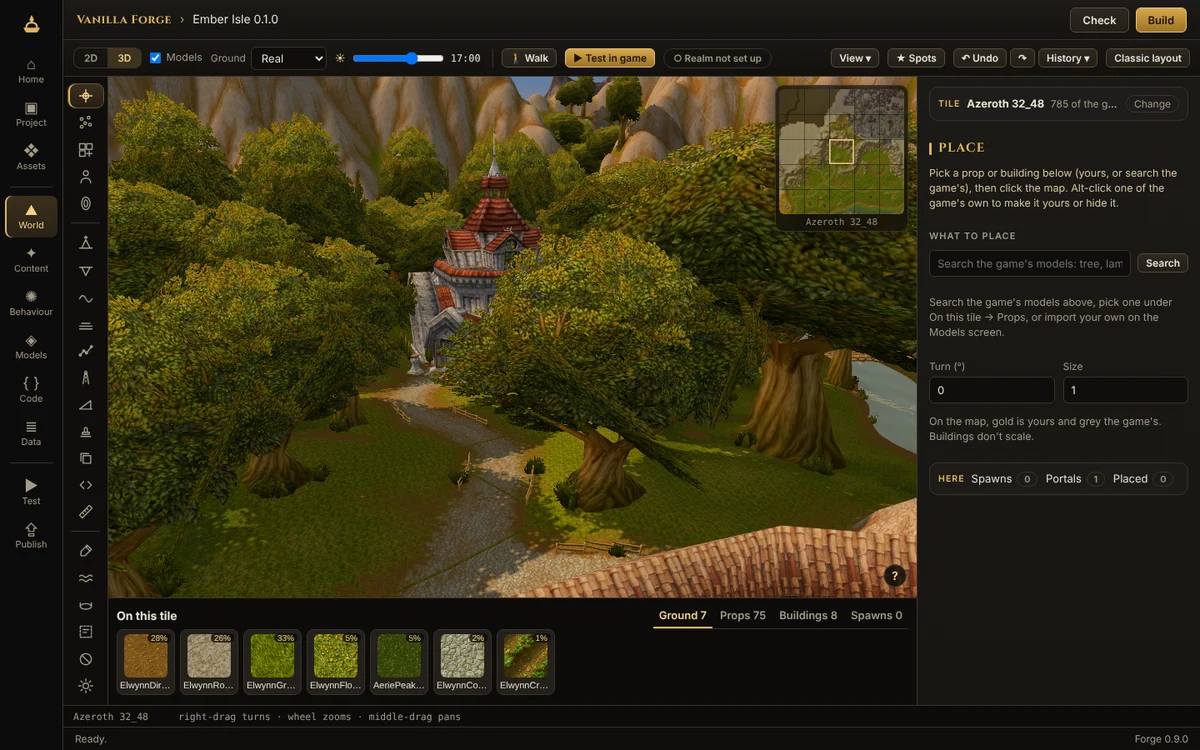
Shape the world, bring your own models, write creatures, quests, items and addons, walk them in game in one click, and publish them as a pack a realm can install. One app instead of a shelf of modding tools, working from the game client you already have, and testing in a copy of it so your game is never changed.
Raise hills, dig valleys, paint the ground with the game's own textures, pour lakes and rivers, set the sky, and place trees, buildings, creatures and portals, in 2D or 3D.
Your own models Coming
A .glb from Blender becomes a creature, a mount with its summon spell, or a prop you can stand on, shown animated the way the game will show it.
Creatures, quests, items Coming
Short forms instead of database tables, fights planned as cards, dialogue with choices and patrol paths drawn on the map. Forge writes the server's tables for you.
Test in game Coming
One button builds your pack, starts a test realm and puts you where you were looking. Change something while you play and apply it without restarting.
Addons Coming
A code editor that catches what the 1.12 client can't run, and a pretend client to try your addon in before you start the game.
Publish a pack Coming
Share what you made on the Workshop as a pack any realm can install. Nothing from Blizzard is ever inside it.
Your Claude Code helpers, as heroes
Vanilla Agents
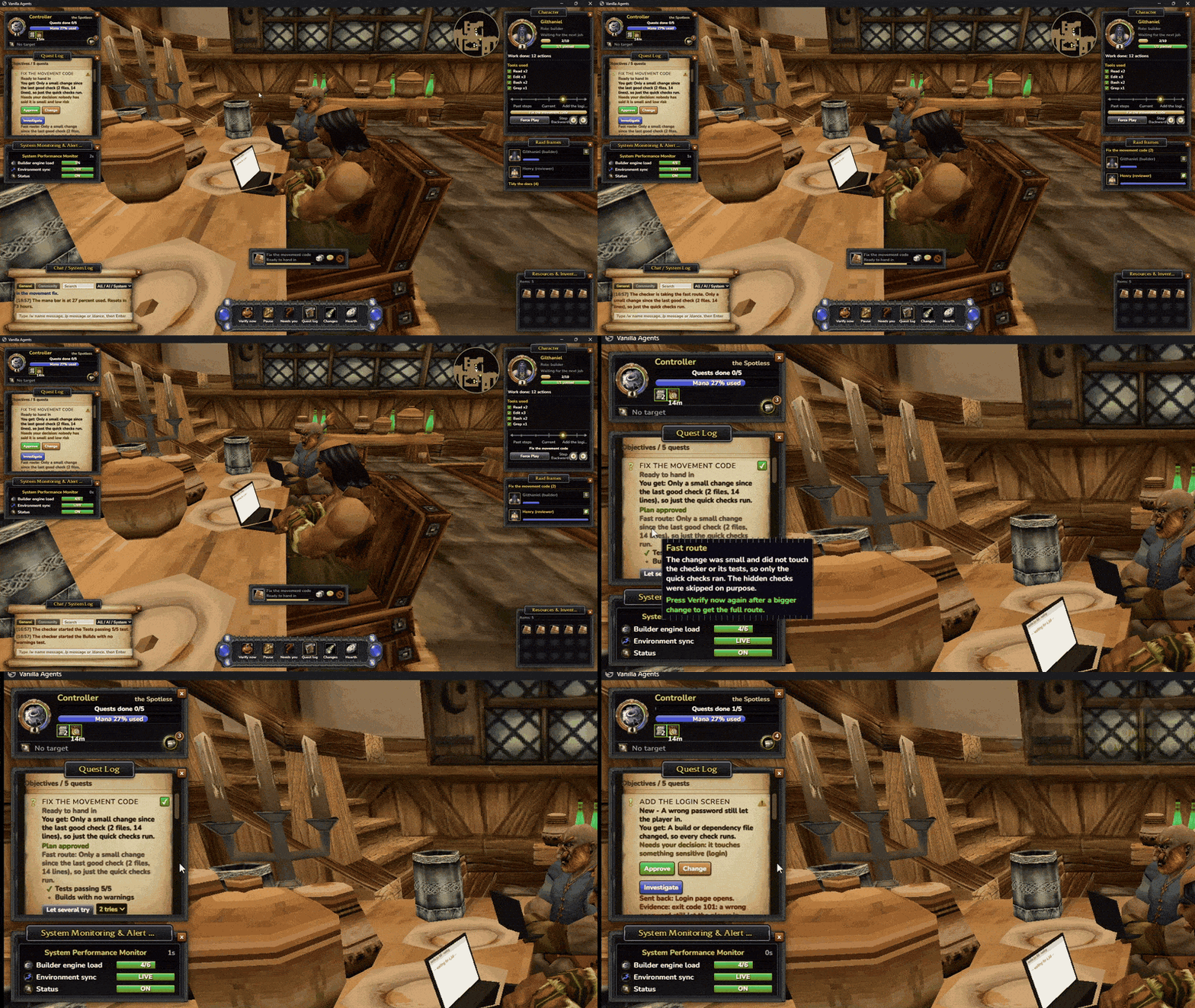
Every Claude Code session walks into a vanilla inn as a helper, sits at a table and opens a laptop that fills with what it is doing. You roam the inn as your own character, approve their quests, and a checker they can't edit runs your real tests before anything counts as done.
Work shows up as quests in a quest log. Nothing goes ahead until you approve it; small, low-risk jobs can start by themselves.
A checker that can't be fooled Live
A quest is only done when your project's real tests pass. Sent back? The quest log shows why, with the evidence.
Who needs you, at a glance Live
A gold "!" over a helper waiting for you, a pulsing raid frame, a sound and a desktop notice when the window is in the background.
Play together Live
Host a party and send one link: friends' helpers walk into your inn, you agree on one plan and split it, and everyone approves their own part.
24 inns, 17 zones Live
Goldshire, Kharanos, Brill, Gadgetzan and more, each with its own light, music and loading screen, all from your own game files.
Try it first Live
The demo fills the inn with six pretend helpers and a barmaid, so you can look around before connecting Claude.
The realm's caretaker
Orion
Orion looks after Open Vanilla day to day. It keeps an eye on every realm, reads the Herald's reports, sorts the bug queue, walks each patch through testing and puts what comes next to a community vote. It works in the open, and a person approves every change before it reaches players.
1Realm status and uptime
Orion checks every realm around the clock: is it up, how many players are on, and how long it has been running.
One live status message in Discord's #server-status, updated every minute
An alert in #alerts the moment a realm goes down, and again when it's back
The same status on the realm list on this site
2The Herald's reports
Every night the Herald signs in with a real browser and plays: it checks graphics, art and frame rate. Orion reads the report and posts what it found. Meet Herald
What passed, what broke and what got slower since yesterday
Anything new goes straight into the bug queue
3The bug queue and AI triage
Reports from Discord's #bug-reports and from the test bots land in one queue. Orion's AI triage reads each one:
Groups duplicates and asks for missing details
Ranks bugs by how many players they hit
Every bug that gets fixed becomes a new automatic check, so it can't quietly come back
4The patch pipeline
Staging→Herald Lite→Live
Every update goes to the staging realm first. Herald Lite, our test bot, plays it: it signs in, buys from a vendor, checks weapon skills and trades a Persona between two characters. Only when it passes does the live realm get exactly that update. A failed run stops there, and live stays as it is.
5Community votes
Players decide what comes next. Orion turns the most-asked-for ideas and the biggest bugs into a shortlist, with its reasons, and the community votes in Discord, one vote per account.
The winners go on the roadmap
Orion posts the results and how the work is going
Guardrails
Orion runs the day to day, but people stay in charge:
Reviewed updates. Orion can propose and test a change, but a person approves it before it ships.
Staging before live. Nothing reaches the live realm without passing Herald Lite on staging first.
In the open. Status, reports, the bug queue and vote results are posted where players can read them.
People hold the money. Orion can prepare a hosting bill, but a human steward pays it.
The Herald's report sample
Daily report · Oct 14Posted by Orion
Vanilla RemasteredOnline · 99.9% this week
Herald Lite on staging3 of 3 passed
Nightly browser run58 fps · 0 missing textures
FoundA tooltip in Bags lost its colour
Bug queueTriaged by Orion
Open12 · 3 new today
Duplicates merged2
Fixed and now checked every push1
VoteNext dungeon tweak · closes Friday
A person approves every changeStaging before liveReports in publicNever buys power
Support pays for hosting. It never buys power. Payments open after launch; nothing is charged until then.
Support the realm
Starfall Giving
Open Vanilla is paid for by the people who play it. Support fills five buckets in order, from the server bill up to the Orion Network. When the last bucket is full, the overflow spills: part of it is given away to causes Orion picks with the community, and every dollar in and out gets a public receipt.
1Fill the buckets
Each month the waterfall fills from the top. A bucket must be full before anything reaches the next:
Base Hosting: the vanilla realms and this site
Orion Brain Fuel: Orion's 24/7 bug triage and the Discord bot
Worker Bounties: paid fixes and community pull requests
Hardware Scaling: a high-tick raid and PvP node
Orion Network Cloud: player-hosted worlds
2The spill
Once every bucket is full, whatever's left spills over and is split:
CausesReserve
Given to causesThree-month reservepreview split
The reserve keeps the realms online through a quiet month. Once it holds three months of costs, everything that spills goes to causes.
3The receipt
Every payment in and every payment out is posted by Orion within the hour: to #receipts on Discord and to the public ledger on this site. A receipt names the amount, the bucket, the payee and the proof (an invoice number or a transfer ID), and it's chained to the receipt before it, so no entry can be quietly edited or deleted afterwards.
Who is Orion?
Orion is Open Vanilla's central intelligence: the AI that runs the project's day-to-day as an autonomous company, on a Linux server we operate. It reads the ledger, pays the hosting bills, triages bug reports, shortlists causes and writes every receipt. It works in the open, and it doesn't have the last word on money:
Two keys. Orion prepares every payment; a human steward co-signs anything that leaves the treasury.
72-hour veto. Every gift to a cause is announced three days before it's sent. A community vote can stop it.
Reserve lock. Orion can't touch the reserve. Spending it needs a community vote.
One ledger. Bills, bounties and gifts all land on the same public ledger as the support that paid for them.
Receipts sample
Receipt #0042Posted by Orion
Server hosting, October−$41.20
BucketBase Hosting
ProofInvoice R-2026-10-0187
Co-signedSteward ✓
Follows #0041 · 9f3c…a71e
Receipt #0043 · Starfall GiftPosted by Orion
Spill to causes, October−$120.00
ToThe season's voted cause
Announced3 days ahead · no veto
Co-signedSteward ✓
Follows #0042 · 4b8e…02cd
Where the spill goes
Each season, players nominate causes in Discord. Orion checks each nominee is a registered charity or an open-source project that can take a gift, posts a shortlist with its reasons, and the community votes: one vote per account. The winners share that season's spill.
Game preservation: open-source engines, emulation and the archives that keep old games playable
Play in hospitals: charities that bring games and consoles to children's wards
Accessible gaming: adaptive controllers and tools for disabled players
Community picks: anything the community nominates that clears the check
What supporters get
Reward
How it works
Starfall Patron
An in-game title and a Discord role while your support is active
Founders' Obelisk
Your name carved in a capital once the realm reaches Level 5
Never buys powerEvery dollar gets a receiptPart of the spill is given away
Payments open after launch; nothing is charged until then.
Proposal · Future
The Orion Network
A network of player-run nodes that carries Open Vanilla's new content to every player and keeps the main realms online through any outage. Nobody has to be trusted: every file and every checkpoint can be checked by anyone, and there's no mining. Run a node, and the realm rewards you for it.
Seed
New Open Vanilla content (zones, models, music, the Vanilla Remastered patches) is cut into small chunks, each named by its own hash. The launcher and the browser fetch chunks from the nearest nodes, like a torrent, and check every chunk against a signed release list before using it. A bad chunk is thrown away and fetched from someone else.
Only Open Vanilla's own original files travel on the network, never the Vanilla Client v1.3 game files.
Relay
Relay nodes sit close to players and carry their game connection to the realm: lower ping in more places, and no single front door to knock over. Traffic passes through encrypted, so a relay can't read or change what it carries.
Ward
Wardens keep a live, always-in-sync copy of a main realm. If the main server goes down, the healthiest warden takes over in seconds and players reconnect where they stood. When the main server is back, it catches up and takes over again.
Checked by anyone, no mining
Files name themselves. A chunk's name is its hash, so a changed file simply has a different name. Nothing can be swapped in under an old name.
Signed releases. Each release list has a Merkle root signed by two of three keys (maintainers and Orion), so one stolen key can't push a release.
The checkpoint chain. Every few minutes the realm hashes its world state into a block that links to the one before. Wardens replay the same changes and must arrive at the same hash, so any tampering breaks the chain where everyone can see it.
Spot checks. Nodes are asked at random to prove they hold a chunk or are online right now. Nodes that fail lose standing, and the rewards that come with it.
No proof of work. Nothing is mined and no electricity is burned on puzzles. A node earns by being useful.
Main realms, without compromise
The network adds copies, speed and backups. It never decides the game:
Each main realm stays one world with one authoritative server. Nodes never resolve combat, loot or trades.
The vanilla rules don't change. A pure realm stays pure, with the same data, the same timers and the same rates.
The ledger of characters and items lives on the checkpoint chain, so a lost server never means a lost character.
Turn every node off and the realms still run as they do today. The network only makes them faster and harder to take down.
Rewards for running a node
A node is one Docker command on a Linux box, a home server or a spare PC with a decent upload. Rewards are counted only for work the spot checks have verified.
Role
Earns
Needs
Seeder
Guardian hours for every verified GB served to players
Disk space and upload bandwidth
Relay
Guardian hours for each hour online with good latency, more in under-served regions
A stable connection, an open port
Warden
The most Guardian hours in sync, plus a bonus for each failover drill passed
A small always-on server with an SSD
Long-running nodes earn titles by uptime, from Spark through Beacon to Constellation, and the Node Keeper's Tabard. Guardian hours earn the node badge and rested experience; rewards are perks and cosmetics: account-bound, never tradeable or cashable, and never power. The network rewards keeping the realm alive; it isn't a coin.
Roadmap
Phase 0 · NowHashed contentGame files streamed in hashed chunks and cached in the browser.
Phase 1SeedersPlayers share patch files peer to peer from the launcher and the browser.
Phase 2RelaysCommunity gateways close to players.
Phase 3WardensLive standbys and the checkpoint chain.
Phase 4Player worldsMicro-realms hosted on the network: the Level 5 bucket.
This is a proposal, not a promise. Tell us what you think in #orion-network on Discord.
After launch
What's next
Two things we're building next. Launch news lands in Discord first.
Warfront SOON™
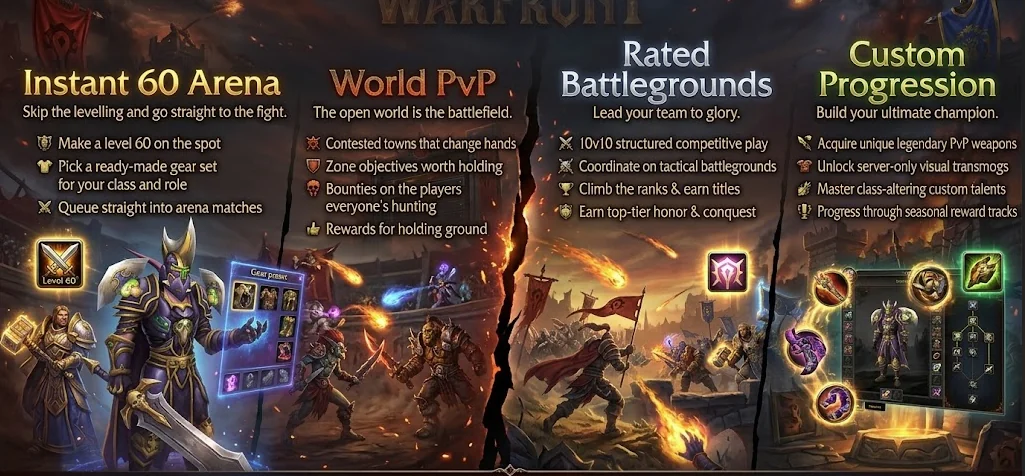
A PvP realm of its own for players who'd rather fight than level. It runs on its own server, so Vanilla Remastered stays exactly as it is.
Instant 60 Arena: make a level 60, pick a ready-made gear set, queue straight in
World PvP: contested towns, zone objectives and bounties
Rated Battlegrounds: 10v10 teams, ranks and titles
Its own progression: PvP weapons, transmogs and seasonal reward tracks
It shows in the realm list, marked SOON™.
Host a realm from a template Planned
Pick a template, name your realm and leave the Orion app running. Hosts who sign the Host Agreement show up in everyone's realm list, and nobody on either side sees an IP address.












 Live now